Introduction
Candy Crush is one of those games that almost everyone has played at some point. Swapping colorful
candies and watching them disappear feels simple as a player, but recreating that experience in the
browser is a completely different challenge. Behind every successful match are drag-and-drop
interactions, score calculations, pattern detection, and constant board updates.
This version of the game adds another layer of excitement by offering two modes: an Endless Mode for
relaxed gameplay and a Timed Mode where players race against the clock. If you're looking for a
JavaScript project that goes beyond the usual calculator or to-do app, this one is a great choice.
What does the game feature?
- Match candies by dragging and swapping them
- Detect rows and columns of three or four candies
- Automatic score updates
- Endless Mode for unlimited play
- Timed Mode with a two-minute countdown
- Change game modes without refreshing the page
- Interactive hover effects for candies
Interface
The HTML structure is surprisingly minimal. Instead of hardcoding every candy block, the page only
provides containers for different parts of the game.
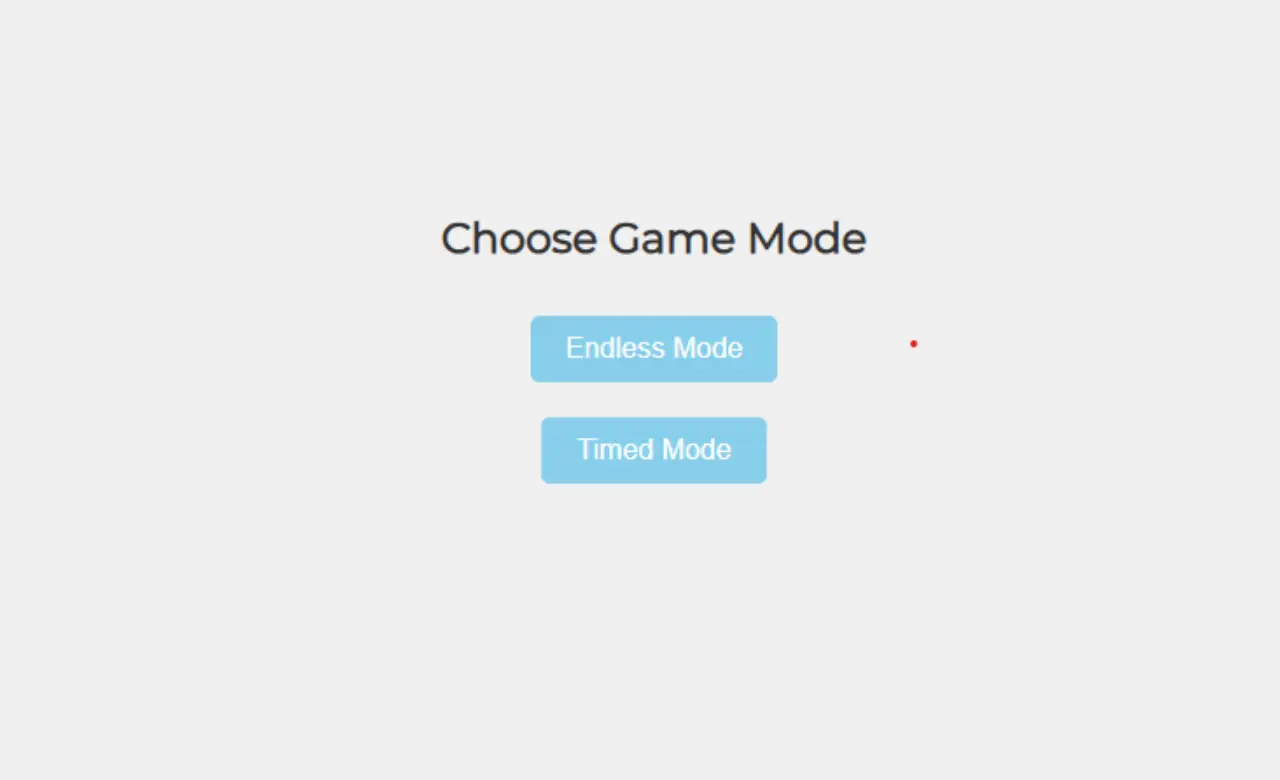
Players first see a mode selection screen where they can decide how they want to play. Once a mode is
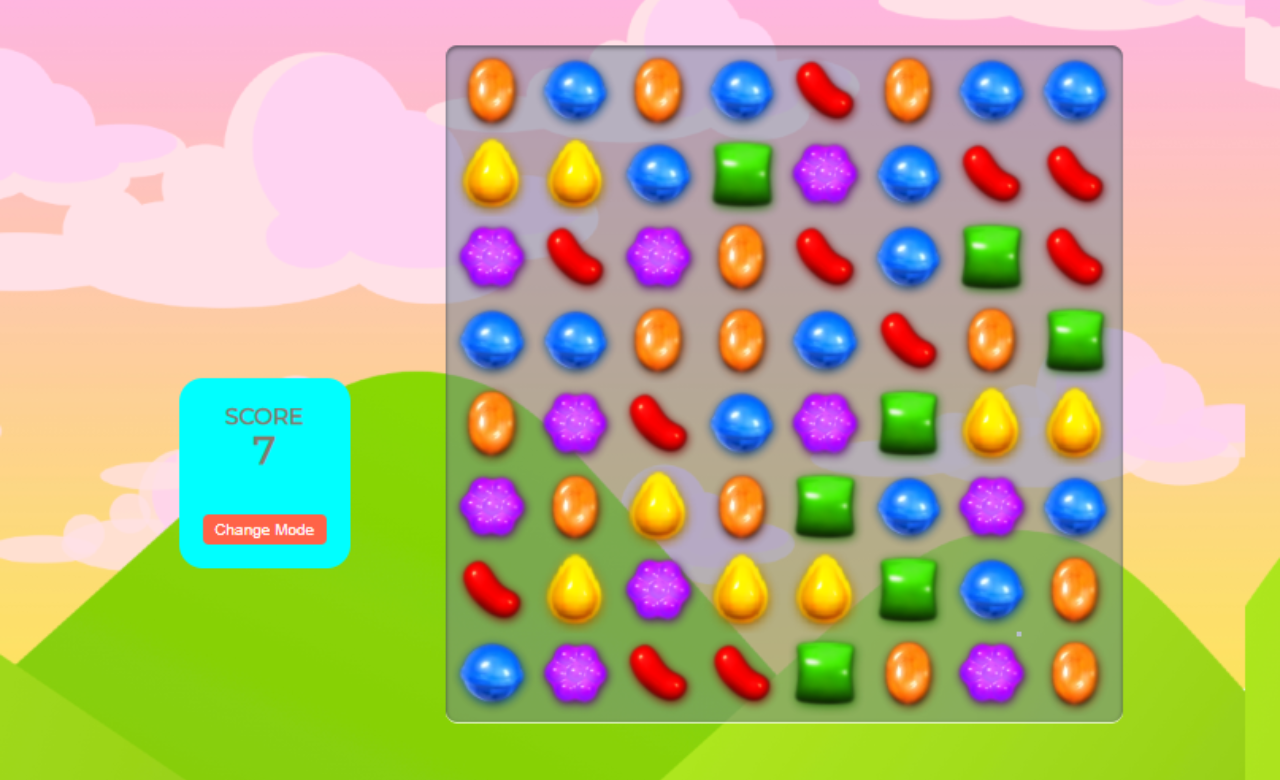
chosen, the scoreboard and game board appear.
The actual board is represented by a single
container:
<div class="grid">
It might look too simple at first, but JavaScript creates all 64 candy squares automatically.
This keeps the HTML clean and easy to manage.
The scoreboard also displays the current score,
timer, and a button that allows players to switch between modes whenever they want.
Making It Look Like a Real Game
A game can work perfectly and still feel unfinished if the presentation isn't right. The styling in this project focuses on creating a clear game board while adding small touches that improve the overall experience.
The board itself is built using Flexbox:
.grid {
  display: flex;
  flex-wrap: wrap;
  height: 560px;
  width: 560px;
}
Since the game uses an 8×8 layout, Flexbox naturally places the candies into rows without requiring a more complicated grid system.
Each candy block has its own background image, and a subtle hover effect makes interactions feel more responsive.
.grid div:hover {
    transform: scale(1.05);
}
It's a small detail, but visual feedback often makes browser games feel much more
polished.
Another smart design choice is hiding the game board and scoreboard initially. Players
aren't immediately dropped into the game. Instead, they begin by selecting either Endless Mode or Timed
Mode, creating a smoother experience from the very first screen.
JavaScript Code Explain
The real magic happens inside the JavaScript file.
Creating the Board
Rather than manually adding dozens of candy elements to the HTML, the board is generated using a loop.
for (let i = 0; i < width * width; i++) {
const square = document.createElement("div");
square.setAttribute("draggable", true);
square.setAttribute("id", i);
let randomColor = Math.floor(Math.random() * candyColors.length);
square.style.backgroundImage = candyColors[randomColor];
grid.appendChild(square);
squares.push(square);
}
Because the board width is set to eight, this loop creates sixty-four draggable squares and assigns each one a random candy image. Storing those squares inside an array makes them easy to access later when checking matches or moving candies around.
Swapping Candies
Dragging candies across the board is what gives the game its identity. However, players shouldn't be allowed to swap just any two candies.
The game validates each move by checking whether the selected squares are actually next to each other.
let validMoves = [
    squareIdBeingDragged - 1,
    squareIdBeingDragged - width,
    squareIdBeingDragged + 1,
    squareIdBeingDragged + width
];
Only left, right, above, and below positions are accepted. If the move isn't valid, the candies return
to their original positions. This small piece of logic prevents the game from feeling broken.
Detecting Matches
Once candies are swapped, the game continuously checks whether a valid combination has been
created.
For example, a row of four is identified like this:
let rowOfFour = [i, i + 1, i + 2, i + 3];
When all four candies match, the score increases and those candies disappear from the board.
score += 4;
scoreDisplay.innerHTML = score;
The same idea is used for rows and columns of three. Instead of refreshing the page, the score updates instantly, making the gameplay feel much more dynamic.
Filling Empty Spaces
Removing matched candies creates gaps on the board. Without handling those empty spaces, the game would
quickly stop functioning properly.
This project solves that by moving candies downward whenever
empty slots appear. New candies are then generated at the top of the board, allowing the game to
continue indefinitely.
It's one of those mechanics players rarely think about, yet it's
essential to keeping the board alive.
Endless and Timed Modes
One of the standout features of this version is the ability to choose how the game is played.
Timed Mode starts with two minutes on the clock: timeLeft = 120;
Once the timer reaches zero, the game ends and displays the final score.
alert(`Time's Up! Your
score is ${score}`);
For players who prefer a more relaxed experience, Endless Mode removes the timer entirely and lets the game continue for as long as they want.
Conclusion
This Candy Crush project shows how simple actions can trigger complex logic. From drag and drop swaps to score updates and board refills, each piece of JavaScript works together to create a game that feels alive. It’s more than just practice code. it’s proof that learning JavaScript can be fun when you build something people actually enjoy playing.
Source Code